Cara Membuat Sparator Box Postingan Blogger
First thing you should do is back up your current Blogger template. Then go to:
DASHBOARD --> LAYOUT --> EDIT HTML, and in the code section, find the following line of code:
Next thing is to hide (or delete) the copied style from "main-wrapper". If I don't do this, my template will look like this:
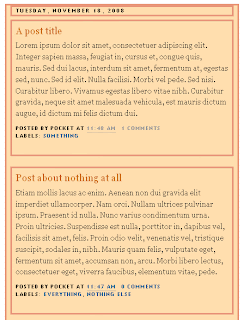 ....to avoid it, I'll hide the style in "main-wrapper" using /* and */....in the code it's like this:
...now, the style for main-wrapper is disabled, and you can see a gap (a Blog background, in fact) between your posts...
To align your sidebar with the post section, find this part of code:
DASHBOARD --> LAYOUT --> EDIT HTML, and in the code section, find the following line of code:
#main-wrapper {
...in my example the whole section looks like this:
#main-wrapper {
background:#FFDEAD;
border: 1px solid #E9967A;
padding-right:7px;
padding-left:7px;
width: 410px;
float: $startSide;
word-wrap: break-word; /* fix for long text breaking sidebar float in IE */
overflow: hidden; /* fix for long non-text content breaking IE sidebar float */
}
...now, I'm going to copy the style (in orange) and paste it in my main-wrapper elements (find the following lines in code):background:#FFDEAD;
border: 1px solid #E9967A;
padding-right:7px;
padding-left:7px;
width: 410px;
float: $startSide;
word-wrap: break-word; /* fix for long text breaking sidebar float in IE */
overflow: hidden; /* fix for long non-text content breaking IE sidebar float */
}
h2.date-header {
margin:1.5em 0 .5em;
}
.post {
margin:.5em 0 1.5em;
border-bottom:0px dotted $bordercolor;
padding-bottom:1.5em;
}
....after pasting the code, it should look like this:margin:1.5em 0 .5em;
}
.post {
margin:.5em 0 1.5em;
border-bottom:0px dotted $bordercolor;
padding-bottom:1.5em;
}
h2.date-header {
margin:1.5em 0 .5em;
background:#FFDEAD;
border: 1px solid #E9967A;
padding-right:7px;
padding-left:7px;
}
.post {
margin:.5em 0 1.5em;
border-bottom:0px dotted $bordercolor;
padding-bottom:1.5em;
background:#FFDEAD;
border: 1px solid #E9967A;
padding-right:7px;
padding-left:7px;
}
....you can see the added code in orange.margin:1.5em 0 .5em;
background:#FFDEAD;
border: 1px solid #E9967A;
padding-right:7px;
padding-left:7px;
}
.post {
margin:.5em 0 1.5em;
border-bottom:0px dotted $bordercolor;
padding-bottom:1.5em;
background:#FFDEAD;
border: 1px solid #E9967A;
padding-right:7px;
padding-left:7px;
}
Next thing is to hide (or delete) the copied style from "main-wrapper". If I don't do this, my template will look like this:
....to avoid it, I'll hide the style in "main-wrapper" using /* and */....in the code it's like this:
#main-wrapper {
/*background:#FFDEAD;
border: 1px solid #E9967A;
padding-right:7px;
padding-left:7px;*/
width: 410px;
float: $startSide;
word-wrap: break-word; /* fix for long text breaking sidebar float in IE */
overflow: hidden; /* fix for long non-text content breaking IE sidebar float */
}
...alternately, you can just DELETE the style from the main-wrapper.../*background:#FFDEAD;
border: 1px solid #E9967A;
padding-right:7px;
padding-left:7px;*/
width: 410px;
float: $startSide;
word-wrap: break-word; /* fix for long text breaking sidebar float in IE */
overflow: hidden; /* fix for long non-text content breaking IE sidebar float */
}
...now, the style for main-wrapper is disabled, and you can see a gap (a Blog background, in fact) between your posts...
To align your sidebar with the post section, find this part of code:
h2.date-header {
margin:1.5em 0 .5em;
..and change it to:margin:1.5em 0 .5em;
h2.date-header {
margin:0 0 .5em;
Save Template.margin:0 0 .5em;


.jpg)